Chapter 7. Support & Integration
Supporting system ecosystem, integration requirements, and dependency management
The authorization system does not operate in isolation — it depends on a rich ecosystem of supporting systems to fulfill its core functions. Identity providers supply the user and group data that the authorization system uses to make decisions. MFA providers enforce step-up authentication obligations. ITSM platforms provide the approval workflow backbone for change management and JIT access requests. PAM systems record privileged sessions and enforce credential vaulting. SIEM platforms consume the authorization audit stream for threat detection and compliance reporting. The following integrated diagram shows all eight supporting system categories and their integration protocols with the central authorization platform.
7.1 Supporting System Ecosystem
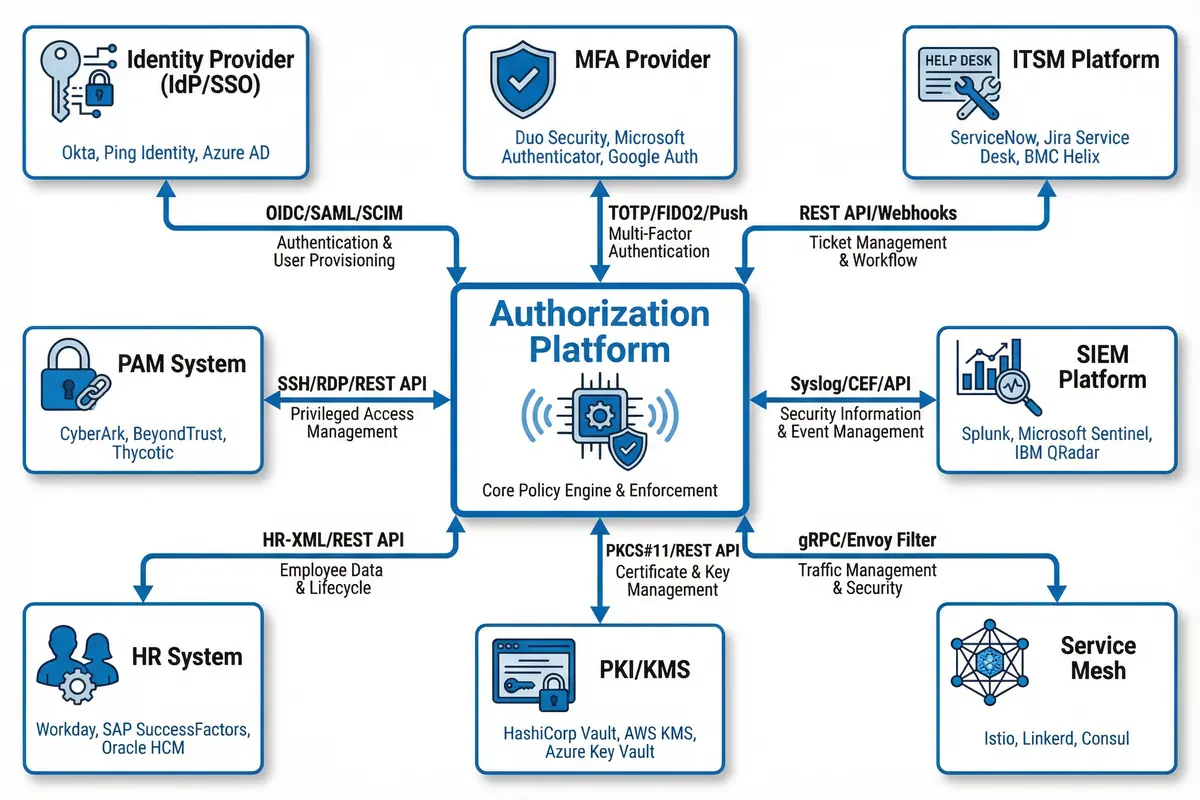
Figure 7.1: Authorization Platform Supporting System Ecosystem — Hub-and-spoke integration diagram showing all 8 supporting system categories (IdP/SSO, MFA Provider, ITSM, PAM, SIEM, HR System, PKI/KMS, Service Mesh) with integration protocols and example products
7.2 Integration Requirements by Supporting System
Each supporting system integration has specific requirements for connectivity, authentication, data exchange format, and failure handling. The following table provides a comprehensive integration specification for each of the eight supporting system categories, including the integration priority, required data flows, SLA requirements, and fallback behavior when the supporting system is unavailable.
| Supporting System | Priority | Integration Protocol | Data Flow | Sync Frequency | Failure Fallback |
|---|---|---|---|---|---|
| Identity Provider (IdP/SSO) | Critical | OIDC/SAML for authentication; SCIM 2.0 for provisioning | User attributes, group memberships, token claims → Authorization Platform | Real-time (webhooks) + hourly full sync | Cached identity data; read-only mode; alert on sync failure >15 min |
| MFA Provider | Critical | TOTP/FIDO2/Push via REST API; RADIUS for legacy | MFA challenge/response; device trust status → Authorization Platform | Real-time (per authentication event) | Fail-closed for MFA-required actions; SMS fallback if configured |
| ITSM Platform | High | REST API (OAuth2); webhook callbacks for approval events | Approval requests → ITSM; approval decisions → Authorization Platform | Real-time (per approval event) | Pending state; escalate to on-call manager; timeout after configured SLA |
| PAM System | High | SSH/RDP proxy; REST API for session management | Session initiation requests → PAM; session recording metadata → Authorization Platform | Real-time (per privileged session) | Block privileged access if PAM unavailable; alert security team |
| SIEM Platform | High | Kafka stream; Syslog/CEF; REST API for alert feedback | Authorization audit events → SIEM; threat alerts → Authorization Platform | Real-time streaming; <60s end-to-end delay | Local buffer; retry; alert on SIEM connection loss >5 min |
| HR System | Medium | HR-XML / REST API; scheduled batch export | Employee status, department, job function → Authorization Platform | Daily full sync; real-time termination events via webhook | Cached HR data; alert on sync failure; manual override process |
| PKI/KMS | Medium | PKCS#11 / REST API (HashiCorp Vault, AWS KMS) | Certificate issuance, key retrieval, secret rotation → Authorization Platform | On-demand (per certificate/key request) | Cached certificates within validity period; alert on KMS unavailability |
| Service Mesh | Medium | gRPC/xDS (Envoy/Istio); mTLS for service identity | Policy push from Authorization Platform → Service Mesh; traffic metadata → Authorization Platform | Push on policy change; <30s propagation | Last known policy; alert on mesh connectivity loss |
7.3 Integration Patterns and Best Practices
Successful integration of the authorization system with its supporting ecosystem requires careful attention to integration patterns, error handling, and operational runbooks. The following best practices have been distilled from production deployments across multiple enterprise environments and address the most common integration failure modes.
| Integration Pattern | When to Use | Implementation Guidance | Common Pitfalls |
|---|---|---|---|
| Webhook Push + Polling Fallback | IdP group sync, ITSM approval callbacks, HR termination events | Register webhook endpoint with HMAC signature validation; implement polling as fallback if webhook delivery fails | Missing webhook retry logic; no signature validation; webhook endpoint not HA |
| Event Streaming (Kafka) | Audit log delivery to SIEM; high-volume authorization events | Use consumer groups for SIEM and analytics; configure retention to match compliance requirements; monitor consumer lag | Consumer lag exceeding alert threshold; no DLQ for failed events; schema evolution breaking consumers |
| Synchronous API with Circuit Breaker | MFA verification, PAM session initiation, real-time approval checks | Implement circuit breaker with configurable failure threshold; define explicit fallback behavior for each integration point | No timeout configured; cascading failures when dependency is slow; no fallback defined |
| Read-Through Cache with TTL | IdP user attributes, HR department data, PKI certificate validation | Cache with appropriate TTL (5-60 min depending on data volatility); implement cache warming on startup; invalidate on change events | TTL too long (stale data); no cache warming (cold start latency); cache not invalidated on revocation |