Chapter 3. Scenarios & Selection
Eight real-world application scenarios with descriptions, technical indicators, and selection guidance
The authorization model must be adapted to the specific operational context in which it is deployed. Different cybersecurity platforms and operational roles present distinct requirements for permission granularity, enforcement mechanisms, and governance controls. This chapter presents eight representative application scenarios drawn from real-world enterprise cybersecurity deployments, each with a detailed description, key technical indicators, and guidance on which authorization model components are most critical for that scenario.

Figure 3.1: MSSP Multi-Tenant SOC — Analysts working across customer-segregated workstations with privileged station area and real-time threat dashboards
In a Managed Security Service Provider (MSSP) environment, analysts simultaneously manage alerts and incidents across multiple customer tenants. The authorization system must enforce strict tenant isolation so that analyst A, assigned to Customer A, cannot access Customer B's alerts, logs, or configuration — even if both customers share the same platform infrastructure. Tenant boundaries must be enforced at the data layer, not only at the UI layer, to prevent cross-tenant data leakage through API calls or bulk exports.
The privileged station area represents a physically and logically separated workspace where senior analysts perform cross-tenant administrative tasks with additional authentication requirements. This zone requires badge-controlled physical access combined with MFA step-up for any privileged operations, and all sessions are recorded by the PAM system for compliance evidence.
| Technical Indicator | Target Value | Enforcement Mechanism |
|---|---|---|
| Cross-tenant data isolation | Zero leakage tolerance | Row-level tenant_id filter at data access layer; API response validation |
| Analyst role scope | Single tenant per session | Session context binding; tenant claim in JWT |
| Privileged station MFA | Hardware token required | ABAC condition: device_trust=high AND mfa_method=hardware |
| Audit completeness | 100% of cross-tenant admin actions | Immutable audit log with tenant_id and operator_id fields |
| Tenant onboarding time | <4 hours to operational | Role template provisioning; SCIM group mapping |

Figure 3.2: Incident Response Workstation — Responder with hardware MFA token managing containment approvals, endpoint isolation status, and action flow dashboard
During active security incidents, responders must execute high-impact containment actions such as isolating endpoints, revoking credentials, blocking network segments, and deploying emergency patches. These actions carry significant operational risk — an incorrect isolation can take a production system offline — and therefore require a carefully designed authorization model that balances speed of response with adequate safeguards against catastrophic errors.
The authorization model for incident response must support just-in-time elevation of privileges for the duration of the incident, with automatic revocation when the incident is closed. High-risk containment actions require a second approver from the change advisory board (CAB) or on-call manager, with the approval ID captured in the audit log. All privileged sessions during incident response are recorded by the PAM system.
| Technical Indicator | Target Value | Enforcement Mechanism |
|---|---|---|
| JIT privilege elevation time | <2 minutes from request to grant | Automated approval for P1 incidents with on-call manager pre-authorization |
| Containment action approval | Dual approval for bulk isolation (>10 endpoints) | Approval workflow with CAB reference; action blocked until approval ID present |
| Session recording | 100% of privileged containment sessions | PAM session proxy with keystroke and screen recording |
| Auto-revocation on incident close | <15 minutes after ticket closure | Webhook from ITSM to binding manager; automated deprovision |
| Audit trail completeness | Every containment action linked to incident ticket | Correlation ID from incident ticket propagated through all audit events |
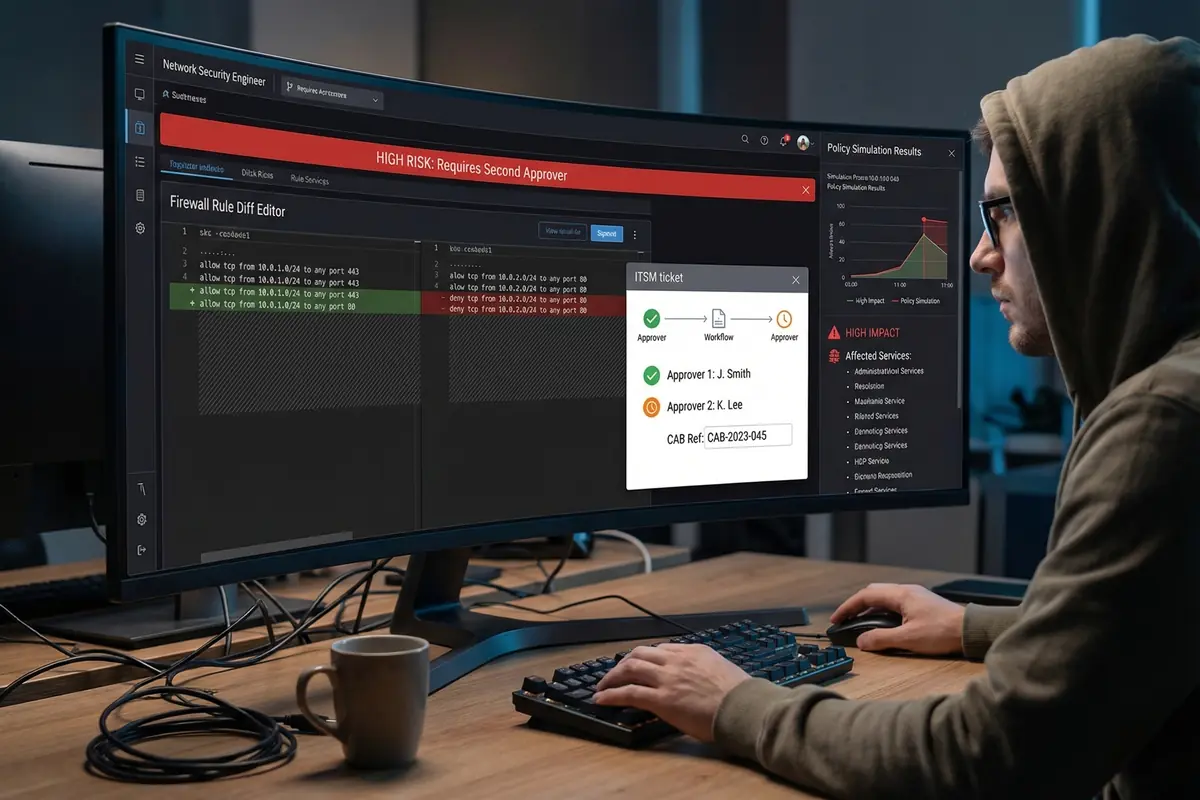
Figure 3.3: Firewall Rule Diff Editor — High-risk change banner, policy simulation results panel, and ITSM dual-approval workflow with CAB reference
Network security engineers managing firewall policies operate in one of the highest-risk authorization scenarios in enterprise security. A misconfigured firewall rule can expose critical systems to the internet, block legitimate traffic, or create security gaps that attackers can exploit. The authorization model must enforce a strict change management workflow that prevents any single engineer from applying a firewall rule change without a second approver reviewing the impact analysis.
The policy simulation capability is a critical component of this scenario — engineers must be able to run impact analysis on proposed changes before submitting them for approval, and the simulation results must be attached to the approval request so that approvers can make informed decisions. The system must also enforce that the CAB reference number is present before any production change is applied.
| Technical Indicator | Target Value | Enforcement Mechanism |
|---|---|---|
| Dual approval enforcement | 100% of production firewall changes | Obligation: requires approval_id from two distinct approvers before apply |
| Policy simulation requirement | Mandatory for changes affecting >100 rules | Pre-flight check in change workflow; simulation report attached to ticket |
| CAB reference validation | Present in all production changes | API validates CAB ticket status before executing change |
| Change rollback capability | Automated rollback within 5 minutes | Snapshot before change; rollback permission scoped to change owner |
| SoD enforcement | Submitter ≠ Approver 1 ≠ Approver 2 | Approval service validates distinct identity for each approval step |

Figure 3.4: Tenant Admin Portal — Self-service user management, bounded role template selector, Provider-Only Zone boundary, and MFA settings toggle
Enterprise SaaS cybersecurity platforms must provide tenant administrators with meaningful self-service capabilities — the ability to manage their own users, assign roles, configure MFA policies, and generate access reports — while maintaining a strict boundary that prevents tenant admins from accessing provider-level controls, other tenants' data, or system configuration. This "bounded delegation" model is one of the most nuanced authorization design challenges in multi-tenant platforms.
The role template selector is a key UX element that presents tenant admins with a curated set of role templates bounded to their tenant's contracted feature set. Tenant admins cannot create custom roles that exceed their contracted permissions, and the provider-only zone is visually and technically separated from tenant controls. All tenant admin actions are audited with the tenant_id and operator_id fields for compliance reporting.
| Technical Indicator | Target Value | Enforcement Mechanism |
|---|---|---|
| Tenant admin scope boundary | Cannot exceed contracted feature set | Role templates bounded by tenant subscription tier; server-side validation |
| Provider-only zone isolation | Zero tenant admin access to provider controls | Separate permission namespace; tenant_id scope enforced at API layer |
| MFA policy enforcement | Tenant admin can require MFA for all tenant users | Tenant-level MFA policy propagated to all user sessions in tenant |
| Access report generation | Available on-demand; covers all tenant users | Report scoped to tenant_id; PII fields masked for non-admin roles |
| User invite flow | Invite-only; no open registration | Invite tokens scoped to tenant; expiry enforced |
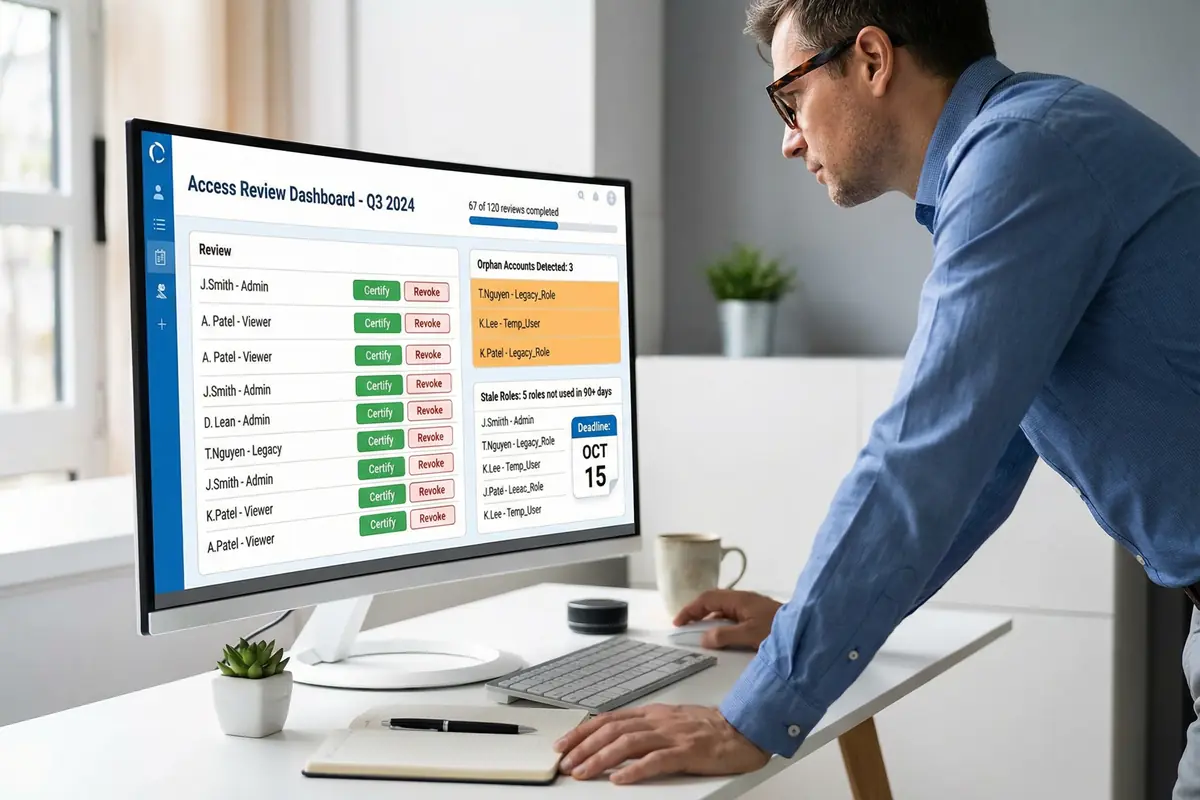
Figure 3.5: Access Review Dashboard — Compliance auditor certifying or revoking user roles, with orphan account detection and stale role identification panels
Periodic access reviews are a mandatory control in most compliance frameworks including SOC 2, ISO 27001, and NIST CSF. The authorization system must support a structured review process where role owners and managers can certify or revoke access assignments for users in their scope. The system must automatically surface high-risk items — orphan accounts, stale roles, and excessive permissions — to prioritize reviewer attention.
The review dashboard must provide reviewers with sufficient context to make informed decisions: the user's job function, last login date, role assignment date, and any anomalies detected in recent access patterns. Decisions must be captured with a reason code and reviewer identity for audit purposes. Automated revocation must execute within the configured SLA after a revoke decision is recorded.
| Technical Indicator | Target Value | Enforcement Mechanism |
|---|---|---|
| Review completion rate | >95% within deadline | Automated reminders; escalation to manager after 80% of deadline elapsed |
| Orphan account detection | Detected within 24h of account becoming orphaned | Nightly reconciliation against HR system; alert on mismatch |
| Stale role detection threshold | Roles unused for 90+ days flagged | Usage analytics from audit log; flag in review dashboard |
| Revocation execution SLA | <1 hour from decision to enforcement | Automated binding removal triggered by review decision event |
| Audit evidence retention | Review records retained 7 years | Immutable review archive with reviewer identity and timestamp |

Figure 3.6: CI/CD Permission Gate — DevSecOps engineer resolving failed permission coverage check with terminal output, YAML registry editor, and automated security alert notification
In modern DevSecOps environments, authorization coverage must be validated as part of the CI/CD pipeline before any new API endpoint can be deployed to production. The permission coverage gate checks that every endpoint in the service's API specification has a corresponding permission ID registered in the permission registry. If any endpoint is missing a permission mapping, the pipeline fails and deployment is blocked until the gap is remediated.
This shift-left approach to authorization governance prevents the accumulation of "hidden endpoints" that bypass the permission model. The automated gate also validates that permission IDs follow the naming convention, that role assignments for new permissions have been reviewed, and that backward compatibility is maintained for renamed or removed permissions.
| Technical Indicator | Target Value | Enforcement Mechanism |
|---|---|---|
| Endpoint permission coverage | 100% — zero uncovered endpoints in production | CI/CD gate blocks deployment if coverage <100% |
| Permission ID naming validation | 100% compliance with naming convention | Linter in CI pipeline; fails on non-compliant IDs |
| Backward compatibility check | No breaking changes without migration mapping | Registry diff tool; requires migration entry for renamed/removed IDs |
| Gate execution time | <60 seconds per pipeline run | Cached registry snapshot; incremental diff against previous version |
| Alert notification latency | <30 seconds from failure to team notification | Webhook to Slack/Teams; PagerDuty for production deployments |
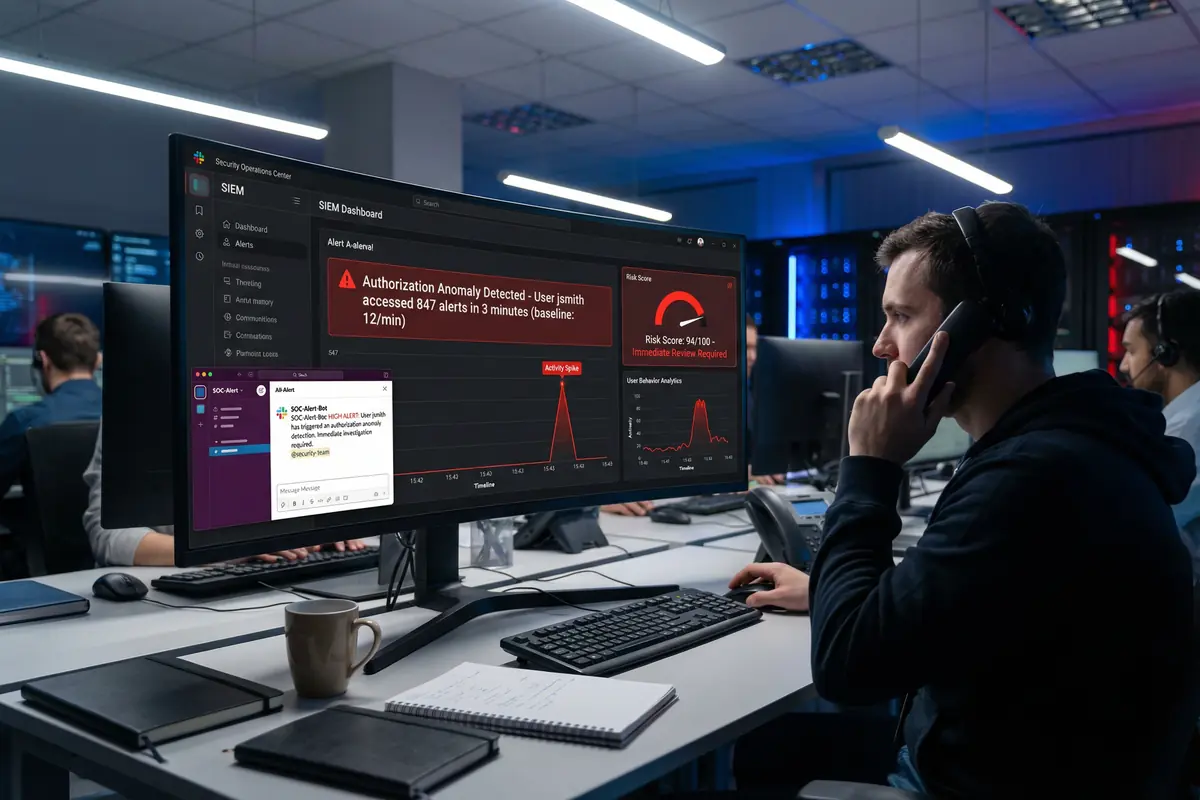
Figure 3.7: SIEM Anomaly Alert — Authorization anomaly detection showing user access spike, risk score panel, user behavior analytics graph, and automated team notification
Authorization systems generate rich behavioral signals that, when analyzed in aggregate, can reveal compromised accounts, insider threats, and privilege abuse patterns. The authorization anomaly detection scenario integrates the audit log pipeline with a UEBA (User and Entity Behavior Analytics) engine to establish behavioral baselines and alert on deviations that exceed configured thresholds.
Common anomaly patterns include sudden spikes in alert access volume (potential data exfiltration), access from unusual geographic locations or network zones, access outside normal working hours, and attempts to access resources outside the user's normal scope. When an anomaly is detected, the system automatically elevates the user's risk score, notifies the security team, and may trigger automatic session termination or step-up MFA requirements for subsequent actions.
| Technical Indicator | Target Value | Enforcement Mechanism |
|---|---|---|
| Baseline establishment period | 30 days of normal behavior | Rolling window analytics; per-user and per-role baselines |
| Anomaly detection latency | <60 seconds from event to alert | Streaming analytics on audit log pipeline; real-time risk scoring |
| False positive rate | <5% of alerts | Multi-signal correlation; tunable thresholds per user group |
| Automated response trigger | Risk score >90 triggers session review | Risk score webhook to session manager; optional auto-terminate |
| Alert-to-investigation SLA | <15 minutes for high-risk alerts | PagerDuty escalation; SOC queue priority routing |

Figure 3.8: Break-Glass PAM Portal — Emergency access initiation with recording indicator, dual-approval confirmation, session countdown timer, and incident reason documentation
Break-glass access is the emergency escape hatch for situations where normal authorization workflows cannot be followed — typically during P1 incidents when the systems required for normal approval workflows are themselves unavailable, or when time-critical actions must be taken faster than the standard approval process allows. The break-glass procedure must be designed to be fast enough to be useful in emergencies while maintaining the strongest possible audit trail and post-incident accountability.
The break-glass system requires dual approval from two senior administrators, records the justification reason linked to the incident ticket, activates PAM session recording from the moment access is granted, and automatically expires the session after a configured maximum duration (typically 4 hours). All break-glass activations trigger immediate notification to the CISO and security team, and a mandatory post-incident review must be completed within 24 hours of session closure.
| Technical Indicator | Target Value | Enforcement Mechanism |
|---|---|---|
| Break-glass activation time | <5 minutes from request to access granted | Pre-designated approvers with mobile push approval; no ITSM dependency |
| Dual approval requirement | Two distinct senior admins required | Approval service enforces distinct identity; SoD validation |
| Session recording | 100% — keystroke, screen, and command recording | PAM proxy activated at session start; recording stored in tamper-evident vault |
| Maximum session duration | 4 hours; no extension without re-approval | Hard expiry enforced by session manager; re-approval required for extension |
| Post-incident review SLA | Within 24 hours of session closure | Automated review ticket created on session close; CISO notification |